


Presenter information
Updated: 29 June 2026
Oral presentations
20 minute presentation
Please note that presentations are strictly limited to 20 minutes. This time allocation includes any questions and discussion.
It is up to you how you choose to use this time. For example, you might deliver a 15 minute presentation followed by 5 minutes for questions, provided the total presentation time remains within the 20 minute allocation.
Panel discussions
45 minute presentation
Please note that presentations are strictly limited to 45 minutes. This time allocation includes any questions and discussion.
It is up to you how you choose to use this time. For example, you might deliver a 40 minute presentation followed by 5 minutes for questions, provided the total presentation time remains within the 45 minute allocation.
Lightning talks
10 minute presentation
Please note that presentations are strictly limited to 10 minutes. This time allocation includes any questions and discussion.
It is up to you how you choose to use this time. For example, you might deliver an 8 minute presentation followed by 2 minutes for questions, provided the total presentation time remains within the 10 minute allocation.
Play break
15 minute presentation
Please note that presentations are strictly limited to 15 minutes. This time allocation includes any questions and discussion.
It is up to you how you choose to use this time. For example, you might deliver an 13 minute presentation followed by 2 minutes for questions, provided the total presentation time remains within the 15 minute allocation.
- Play breaks will take place in the lunch breaks
- Please email leanne@conference.nz by 1 August, with your set-up requirements, details of any equipment you plan to bring, and a brief outline of your play break.
Workshops
60 minute presentation
Please note that presentations are strictly limited to 60 minutes. This time allocation includes any questions and discussion.
It is up to you how you choose to use this time. For example, you might deliver an 55 minute presentation followed by 5 minutes for questions, provided the total presentation time remains within the 60 minute allocation.
- Please email leanne@conference.nz by 1 August with your set-up requirements, details of any equipment you plan to bring, and a brief outline of your workshop.
Presentation instructions
Preparation
- We recommend using PowerPoint for your slides in a 16:9 aspect ratio. There is no requirement to use conference branding on your presentation slides.
- Embedded videos can be played during your presentation; however, we recommend having these downloaded as a backup. The AV team may also request that video files are provided separately.
- We suggest embedding all fonts used in your PowerPoint presentation when saving the file, as some fonts may not be supported on other devices.
- Please test all videos, animations, hyperlinks, and embedded content before submitting your presentation.
Please name your presentation file using the following format:
Paper Number_Surname e.g. 123_Smith
Uploading
- You are welcome to upload your PowerPoint presentation via the button below at any time. Please follow the prompts carefully and enter all information correctly so the AV team can easily identify and prepare your presentation for the day of your session.
- Please ensure you upload your final presentation. Due to the volume of presentations received, we are unable to make amendments once a presentation has been uploaded.
- All presentations must be received by our team at least 48 hours prior to your scheduled presentation time, either via the upload portal or onsite through the speaker preparation team.
Onsite
- Each room is equipped with a laptop, projector, screen, lectern, microphone and Wi-Fi.
- If you are submitting your presentation onsite, please do so with the speaker preparation team at least 48 hours prior to your scheduled presentation time. If you have already uploaded your presentation via the portal, there is no requirement to visit the speaker prep desk.
- Even if you have uploaded your presentation in advance, please bring a copy on a USB drive or ensure it is saved in a secondary location that can be easily accessed online as a backup.
- Presenters may use their own laptops; however, it is their responsibility to ensure they have the appropriate adapters and connections. Please note that any additional time required for setup will be taken from your allocated presentation time.
- On the day of your presentation, please arrive at your presentation room 10 minutes before the start of your session so the Chairperson can ensure all presenters are ready.
- At the conclusion of your presentation, and if time permits, the Chairperson will facilitate a Q&A session for the remainder of your allocated time. If you do not wish to participate in a Q&A session, please advise the Chairperson in advance and they will close the presentation following your talk.
- If you require assistance onsite, please speak with the registration team or speaker preparation team, or press the assistance button located in your presentation room.
- Please note that the speaker preparation team is expected to be very busy onsite assisting with last minute enquiries and presentation uploads. To avoid queues and save time, we strongly recommend uploading your presentation via the online portal prior to arriving at the conference.
PowerPoint tips (not compulsory)
- Choose a font style and size that can be easily read from a distance.
- Keep text concise and minimise the amount of text on each slide.
- Use visuals and graphics to help communicate your message.
- Keep slide backgrounds simple and consistent throughout your presentation.
- Use high contrast between background and text colours.
- Avoid using ALL CAPS, as it can be difficult to read.
- Avoid placing text over busy images or colourful backgrounds, as this can reduce readability.
Powerpoint presentation upload link (do not upload posters via this link)
Please click the link to upload the PowerPoint presentation that will accompany your talk.
Reminder:
Please name your presentation file using the following format:
Paper Number_Surname e.g. 123_Smith
Poster presentation
10 minute presentation
Please note that presentations are strictly limited to 10 minutes. This time allocation includes any questions and discussion. It is up to you how you choose to use this time. For example, you might deliver an 8 minute presentation followed by 2 minutes for questions, provided the total presentation time remains within the 10 minute allocation.
All posters presented at the conference will be displayed electronically. As this may be a new presentation format for some, we have detailed below instructions on both display, formatting and submitting your poster prior to the conference.
Please note the following:
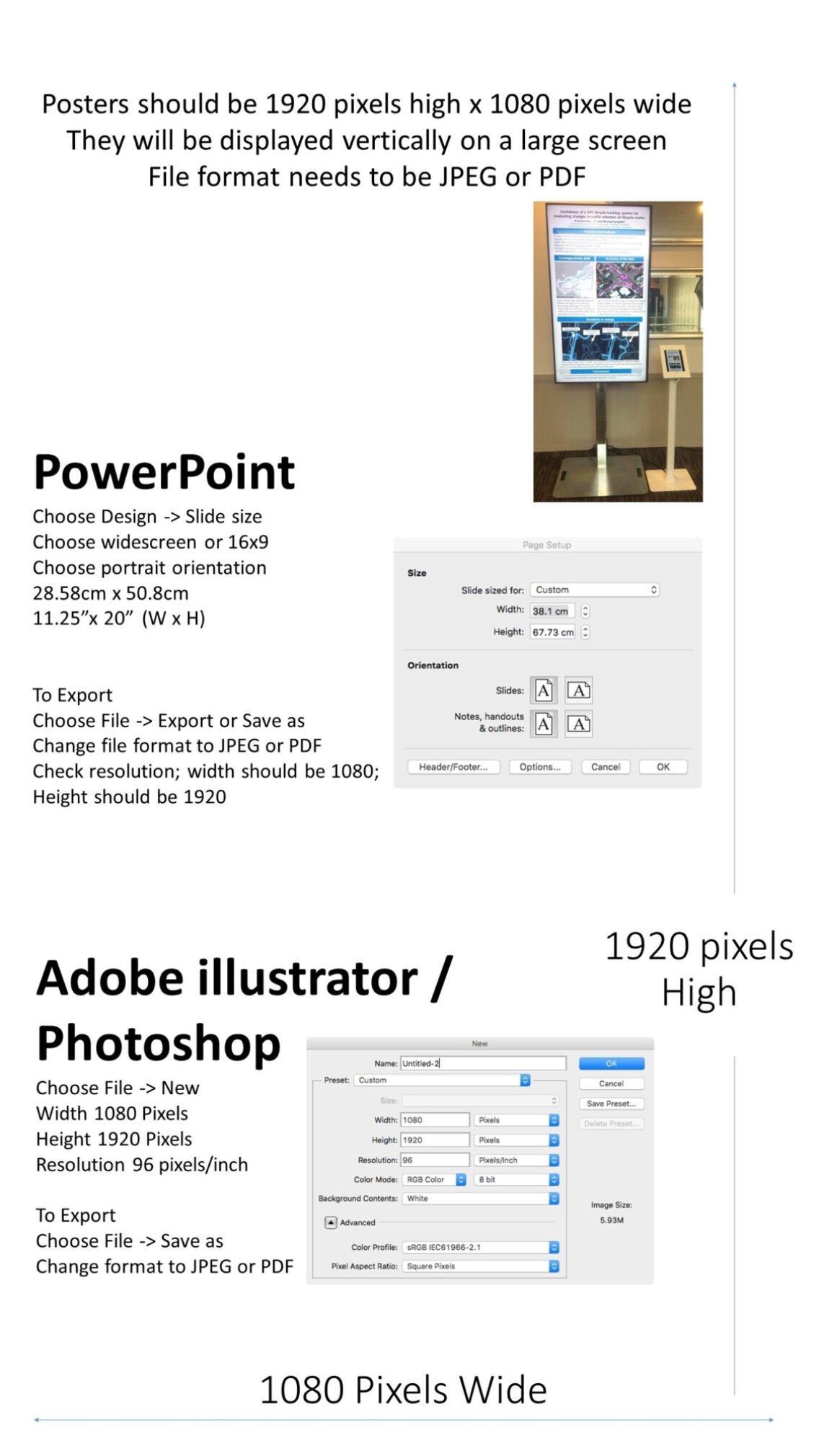
- Poster will only be displayed electronically, portrait style, no physical hard copy of your poster is required.
- Electronic files are required to be submitted by Friday 4 September.
- You have previously been sent a link to upload your poster. If you require this again contact leanne@conference.nz. Do not submit via the above link.
- Electronic posters will be available to all delegates on the Conference App.
- Poster authors will be asked to stand by an electronic screen to answer questions (about your poster) in the lunch breaks.
Poster display and formatting requirements:
- Posters will be displayed on a 60-inch (1522mm) plasma screens (aspect ratio 16:9 wide screen) set up portrait style.
- Posters should be set up in a jpg or pdf format (portrait mode) with a resolution of 1920 high x 1080 wide pixels.
- Posters cannot be interactive, please do not embed links.
- Each screen will have an iPad located next to it that will allow you to find, display, navigate and ‘zoom in’ on your poster.
Tips for making a successful poster (not compulsory):
- Titles and sub-headings should be short and to the point.
- The content should be concise and logical.
- The design should look good, using attractive colour, graphics and typography.
- Rewrite your abstract into poster format. Simplify everything and avoid large amounts of data.
- Use bold characters to stress a point. Use them sparingly and in preference to underlining or writing phrases or sentences in capitals.
- Avoid over-crowding your poster. Leave “breathing space” around the text to make it more readable. Aim for 20% text, 40% graphics and 40% empty space.
- Stick to the same size and style of type for all body type. Illustration captions can use a different type, size, and style, but keep this consistent throughout all captions in the poster.
- Keep body text left aligned and all columns should be of equal width.
- Use photographs or coloured graphs where possible to add visual interest.
- Convert complex numerical tables to graphs or charts. Avoid long numerical tables.
- Use plain, familiar fonts such as arial, Helvetica, Calibri, or times new roman.
- Headings should be in capitals and lower case, not all capitals.
- Bullet points are easier to read (use phrases rather than full sentences)
- Avoid italics other than in scientific names.
- Use active voice, short sentences, and simple words.
- Graphics should make up a large portion of your poster.
- Graphics should be visible from two metres away.
- Tables are preferable to figures for small data sets.
- Stick to simple 2-D line graphs, bar charts, and pie charts.
- Use clearly distinguishable colours for line graphs and histograms to identify data sets. Avoid elaborate shading and cross-hatching.
- Photos should have at least 300 dpi resolution in order to reproduce well.
- Do not use pictures from websites. Apart from copyright problems that may arise, the resolution of web illustrations is usually too low to reproduce on the screen clearly.
Poster presentation upload link
If you can't find the link that was previously sent to you, please contact leanne@conference.nz
Film presentations
Film presentations will take place in either the conference programme or at the film evening. You have been notified of your place in the programme and running time. If you can't find this, please contact leanne@conference.nz
- Presentations at the film evening will have a maximum of 5 minutes to introduce their film.
- Your film needs to be submitted 2 weeks prior to the start of the conference.
- Even though you will have uploaded your presentation in advance, please bring a copy on a USB drive or ensure it is saved in a secondary location that can be easily accessed online as a backup.
- By submitting your film, you confirm that all images and third-party materials used in their presentation are appropriately licensed and permitted for sharing and distribution by the conference organiser in New Zealand - subject to permission being given to share.
Film presentation upload link
Please click the link to upload your film presentation.
Reminder:
Please name your presentation file using the following format:
Paper Number_Surname e.g. 123_Smith
General for all presenters
- All presenters must be registered to attend the conference.
- Please ensure all content, images, and data included in your poster are appropriately credited and that any required permissions have been obtained.
- Presentation times, rooms, and poster screen allocations are subject to change. Please refer to the final programme and any updates provided by the conference organisers.
Questions?
Contact leanne@conference.nz with any questions you may have.
